
저자: TechteamGB · 외국인
요약 보기
결론: 2017년 AMD Ryzen 7 1700 스톡 쿨러(Wraith Spire)가 Intel 7700 스톡 쿨러보다 온도·소음·가격 면에서 낫다고 평가한 하드웨어 리뷰 영상이며, 투자 관련 내용은 없다. 제품 구성: AMD 시스템은 Ryzen 7 1700, ASUS B350 Prime 보드, 코르세어 16GB RAM, Intel 600p SSD를 포함하고, Intel 시스템은 i7-7700(non-K), ASUS Z270P Prime 보드, Crucial 16GB RAM, Intel 600p SSD를 포함한다. 쿨러 비교: Wraith Spire는 RGB LED와 높이가 인상적이며 Intel 스톡 쿨러보다 훨씬 두껍다. 온도 비교: Intel 시스템은 유휴 약 42°C, 풀로드 약 79°C였고, AMD 시스템은 유휴 약 37°C, 풀로드 최고 65°C에서 팬 가동 후 약 53°C로 안정화되었다. 오버클럭 테스트: 7700을 3.8GHz(약 1.385V)로 오버클럭했을 때 95°C까지 올라 테스트를 중단했으며, 고오버클럭에는 더 큰 쿨러나 수랭이 필요하다고 언급했다. 소음: 두 스톡 쿨러 녹음 비교에서 Intel 쿨러가 체감상 더 시끄러웠다고 밝혔다(측면 패널 개방, 다른 팬 없음 조건). 가격: 당시 AWD IT 기준 AMD 번들 £499.93, Intel 번들 £599.98로 Intel이 약 £105 더 비쌌다. 성능: AMD는 코어 수가 두 배라 비게임 작업에서 유리하며, 1080p 게임에서는 단일 스레드 차이로 수치가 다를 수 있고 1440p·4K에서는 거의 동일하다고 설명했다. 결론: 가격·온도·소음·비게임 성능을 고려해 Ryzen 번들을 추천했다. 출연자 전망: 투자 관련 전망 발언 없음.
다듬은 글
since the comparison for the 7700 K versus the 1700 Ryzen chip with two almost identical systems did so well. And if you haven't seen that, check out the card up above. Uh I thought I would do a fairly similar comparison, but something that you've been asking for, which is the Wraith Spire Cooler. Now, this is the stock cooler that comes with the Ryzen 7 1700 CPU, but I thought I'd make it a bit more interesting and also compare it to the Intel stock cooler that comes with the nonK series CPUs.
So, in this case, we're using a 7700. Now, these bundles were actually kindly provided by AWD it. And you can check out these bundles in the links down below, especially if you're in the UK and you want to pick these up. But uh to give you an idea of the specs, the Intel spec or the Intel bundle that we have is as I said a 7700 nonK variant which obviously still clocks to 4.2 GHz on its own using its boost.
We also have an Asus Z270P Prime board as well as 16 gigs of Crucial Value memory. Now this also comes with uh an Intel 600p SSD, at least in my kit. I don't believe that this is actually what comes with the normal kit itself and I can't find it on the website. So, I'm not entirely sure if they're currently selling it yet, but either way, uh, the 600P is actually getting its complete own video, so do stick around for that one.
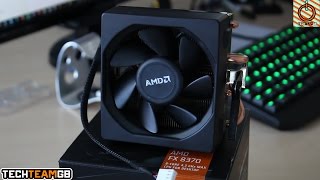
The AMD system is almost identical in that it has a Ryzen 7700 and ASUS B350 Prime board as well. So, a similar type of motherboard and also 16 gigs of Corsair value RAM. Now, this one also did come with the Intel 600p SSD, but again, that will be a separate video, so do stick around for that one. Taking a look at the coolers themselves, we can see that the Wraith Spire is pretty awesome looking with its RGB LED around the rim and obviously the white AMD logo.
It's also considerably thicker. In fact, it looks almost double the height of the stock Intel heatsink. And considering this is a stock heat sink that comes with the Ryzen 7 1700, it's actually pretty impressive. Now, the stock Intel heatsink is actually pretty tiny. So, you can kind of expect and potentially even see where this is going.
But, uh, yeah, let's get into the temps. Taking a look at the Intel system first. With the idle temperatures, it did vary quite a lot depending on what the CPU utilization was at the sort of idle state. A good average for this was about 42° C. Under full load, 100% on all threads and all cores, you're looking at 79° C.
So, pretty toasty. When it comes to the AMD system, however, I was actually really, really impressed. Now, the idle temperature was a very stable 37° C. And when fully maxed at the chip at 100% CPU utilization across all cores and all threads, you were looking at 65° at a peak. And when the fan ramped up just a little bit more after a couple of seconds of it sort of working itself out, it stabilized itself at just 53° C.
That is really very impressive. And the other thing to mention is that that is at stock clocks. And while I can't overclock the 7700 K at least that easily anyway, or the 7700 nonK, should I say, the seen hundred I thought I'd give it a little bit of a push. I overclocked it to 3.8 GHz running at I think 1.385 volts and that was pretty much just too hot.
It ran to 95° C before I just wasn't comfortable with it at that temperature. So, I stopped all the stress testing and ended it there. But obviously, this isn't necessarily designed for heavy overclocks on this one. So, you perhaps want a big bigger terracer or something like an all-in-one water cooler.
Now, the next question you're probably asking is, well, the Intel cooler kind of could have been quieter, right? No. Here's a quick sound test of the Intel stock cooler. And here's one of the AMD stock cooler. Now, the difference may not be too audible when it comes to these recordings, but I can tell you from firstirhand experience that the Intel stock cooler was a considerable bit louder.
Now, of course, this was with the side panel open, although no other fans besides the graphics card fans, which do actually turn themselves off when not being used, which they weren't for this test. Uh, there was no other fans on in this system. It was only the AMD or Intel stock coolers. Uh, this is obviously going to be a little bit contrary to what you may experience with some fans in the front or the top or the side or the back or wherever else in your case and the side panel on as my testing was done with no other fans in the chassis but having the side panel off as well.
Another question you might be asking is, well, the Intel bundle could have been cheaper, right? Well, not quite. AWD it at the time of filming are selling the Ryzen bundle for £499.93 whereas they're selling the Intel bundle for £59.98 a full £105p more expensive. Now that doesn't include the SSD although it does include 16 GB of the Crucial RAM and obviously the motherboard and the CPU and the stock coolers.
Uh and overall that's actually a pretty good deal for both of them. But obviously the Ryzen bundle does come in cheaper, cooler, and quieter as well. Now, I want to make it clear that this isn't necessarily a fair fight, the AMD system will absolutely demolish the 7700 when it comes to non-gaming applications as it is literally double the core count.
And while it doesn't necessarily have the same single threaded performance, so especially at 1080p playing games, you might not see the exact same numbers there. When you get into 1440p and 4K, it's almost identical. So, I wouldn't be too worried about that either. Overall, especially the Ryzen system is a really impressive buy and I definitely recommend it considering that it's cheaper, cooler, quieter, and more performance when it comes to anything that it isn't gaming and still equally performance when it comes to gaming, too.
So, I'd love to hear what you think in the comments down below. Which bundle would you prefer out of the two if you had to pick one? Uh, and otherwise, that's kind of it. If you want to learn any more about these, I'll leave a link to AWD in the description down below for both the Intel and the AMD bundle.
And of course, there's overclocks UK and Amazon affiliate links in the description down below, too. If you're not from the UK, or if you just want to buy anything else that isn't these bundles necessarily, it'd be fantastic if you could use those links. It genuinely supports me, supports the channel, helps me uh, you know, keep paying the rent and all that sort of stuff.
So, if you do that, that would be fantastic. Otherwise, I'll leave some other videos over here for you. Of course, the other comparison in the cards up above and otherwise the subscribe button over here, too. If this is your first TechMGB video, I'd love to hear what you think in the comments down below.
I try and reply to as many comments as I can. So, I'd love to to speak to you there. Also, feel free to follow me on Facebook and Twitter @ tetmgb on both. And otherwise, uh yeah, thank you for watching. Hope you enjoyed it. And we'll see you all in the next video.


Comments 0